Is Power Automate HIPAA Compliant? A Straight Answer for Care Teams
Power Automate is in-scope for Microsoft's HIPAA BAA, but no tool is HIPAA compliant by itself. What Microsoft covers and what your team must configure.
In this article · 13 sections
The short version: no tool is “HIPAA compliant” by itself, and Power Automate is no exception. What is true is that Power Automate is a service Microsoft includes under its HIPAA Business Associate Agreement, so you can use it to handle protected health information. Whether your solution is compliant depends on how your organization configures and uses it. That distinction is the whole answer, and most write-ups get it wrong in one direction or the other.
If your care organization is weighing Power Automate to handle inquiry email, intake forms, or any workflow that touches resident or patient information, here is the accurate picture, sourced from Microsoft’s own documentation.
Sources are linked inline and reflect the June 2026 check. This is technical guidance, not legal advice.
What “HIPAA compliant” actually means
HIPAA does not certify software. There is no government stamp that makes a product “HIPAA compliant,” and Microsoft says so directly: a Business Associate Agreement helps support your compliance, but “using Microsoft services doesn’t on its own achieve HIPAA compliance,” and your organization “is responsible for ensuring that you have an adequate compliance program and internal processes in place” (Microsoft HIPAA/HITECH documentation).
The structure underneath that is worth understanding, because it tells you where your responsibility starts:
- A covered entity is a healthcare provider, plan, or clearinghouse that handles protected health information (PHI). Many senior-living and care operators are covered entities, or handle PHI on behalf of one.
- A business associate is a vendor that creates, receives, maintains, or transmits PHI for a covered entity. When you use a cloud service to process PHI, that cloud provider becomes your business associate (HIPAA and HITECH overview, Microsoft).
- A Business Associate Agreement (BAA) is the contract between them that sets out how PHI must be protected.
So the real question is not “is Power Automate compliant?” It is “is Power Automate a service Microsoft will cover under a BAA, and can my team configure it to meet our obligations?” The answer to both is yes.
Is Power Automate covered by Microsoft’s BAA?
Yes, it is an in-scope service for the BAA, and that is coverage, not compliance. Power Automate appears explicitly on Microsoft’s list of in-scope cloud services for the HIPAA BAA: “Power Automate cloud service either as a standalone service or as included in an Office 365 or Dynamics 365 branded plan or suite” (Microsoft in-scope cloud platforms and services). The same list covers Power Apps and Power BI, and Microsoft’s healthcare compliance overview confirms the BAA applies across “Microsoft 365/Office 365, Dynamics 365, Microsoft Power Platform, and Azure” (Compliance in Microsoft for Healthcare).
One limit to mark now, because it trips people up: the BAA covers in-scope Microsoft services only. If your flow uses a non-Microsoft connector to a third-party service (a separate email sender, an SMS gateway, an outside CRM), that vendor is its own business associate and needs its own BAA with you. Microsoft’s agreement does not extend to them.
Two related services worth knowing about if your build grows:
- Microsoft Dataverse, the data store most Power Automate solutions write to, sits inside the Power Platform that the BAA covers, and keeps your data in the tenant and Azure geography you provision, subject to your data-residency settings (data location, Power Platform).
- Microsoft Copilot Studio, if you add a conversational agent, is also covered under the HIPAA BAA, though Microsoft notes it “isn’t intended for use as a medical device” (Copilot Studio compliance). It is also the least mature surface for PHI, because its generative output is non-deterministic, so keep conversational agents out of the PHI path or gate them tightly.
How you get the BAA: there is nothing to sign
This surprises people. You do not negotiate or sign a separate HIPAA agreement with Microsoft. The BAA is included by default through the Microsoft Product Terms (formerly the Online Services Terms) and the Data Protection Addendum, for any customer that is a covered entity or business associate. Microsoft makes the BAA available by default through the Online Services Terms and the Data Protection Addendum (Microsoft HIPAA/HITECH FAQ).
In plain terms: if you hold a standard Microsoft licensing agreement, the BAA already applies to the in-scope services. Which licensing plan you hold affects features and cost, not whether the BAA applies. What you still owe is your side of it.
The line that matters: shared responsibility
Microsoft handles the platform. You handle how you use it. Acting as your business associate, Microsoft provides the safeguards inside the in-scope services and makes contractual commitments on data safeguarding and breach notification. But Microsoft is clear that the BAA does not make you compliant: your organization remains responsible for an adequate compliance program and for ensuring “your particular use of Microsoft services aligns with your obligations under HIPAA and the HITECH Act” (Microsoft HIPAA FAQ).
| Microsoft handles | Your organization handles |
|---|---|
| Physical, technical, and administrative safeguards inside the in-scope services | Configuring the service so PHI is protected (DLP, auditing, least-privilege access) |
| The HIPAA BAA, included via the Product Terms and DPA | Your own policies, training, risk analysis, and processes |
| Breach-notification commitments as a business associate | Deciding what PHI a flow touches and where it is stored |
| Independent audits and certifications | Verifying your specific use meets your obligations, with counsel where needed |
Microsoft’s in-scope services are independently audited for standards including ISO/IEC 27001 and the HITRUST Common Security Framework (HIPAA and HITECH certifications).
A Power Automate flow you build can be compliant or not depending entirely on how it is configured. The platform gives you the tools. Using them is the work.
What your team must configure
This is where a Power Platform build earns its technical half of the word “compliant,” and it is exactly what a capable team can own. The other half stays with your organization: policies, training, risk analysis, and counsel. The controls below are native to the platform.
- Data loss prevention (DLP) policies. A tenant or environment admin classifies connectors as Business, Non-business, or Blocked in the Power Platform admin center. A connector in the Business group cannot pass data to a connector in another group. You decide each connector’s group; DLP enforces by grouping and does not inspect data, so it is a structural guardrail, not PHI detection. Connector action control narrows this to individual actions (Manage data policies, connector action control).
- Dataverse auditing. Turn on auditing at the environment, table, and column level to log who created, updated, or deleted a record and what changed. Logging who read or accessed a record is a separate setting you enable explicitly (Manage Dataverse auditing).
- Role-based and field-level security. Dataverse security roles control row, field, and hierarchy access, including field-level security on sensitive columns, so each person sees only what their job requires (identity and access, Power Platform).
- Environment isolation. Build PHI-handling solutions in a dedicated environment created in the Power Platform admin center, not the shared default one, and use a security group to restrict who can access and administer it. Scope your DLP policy to that environment. Managed Environments add governance such as sharing limits and usage insights (create and manage environments, managed governance).
- Activity logging. Microsoft Purview logs Power Automate flow lifecycle events (create, edit, delete) and permission changes across the tenant (Power Automate activity logs in Purview). Note the boundary: Purview captures those administrative events, not individual flow runs; run-level detail lives in Dataverse run records, and in Application Insights if you wire it up.
- Secure inputs and outputs. By default, a flow’s run history shows each action’s inputs and outputs, which can expose PHI to anyone who can open the run. Turning on Secure Inputs and Secure Outputs hides that content from run history and logs (secure data in cloud flows).
- Minimum necessary by design. Extract and store only the fields the workflow needs. The less PHI a flow touches, the smaller your exposure.
- The wider Microsoft 365 surface. DLP and auditing do not cover every path PHI can take. Lock down sharing on any Outlook mailbox, SharePoint site, or Teams location the flow writes to, and confirm Microsoft Entra access is scoped. Treat the controls above as necessary but not sufficient.
None of this requires custom code. It is configuration and governance, which is the citizen-development skill set, and it is teachable. It is also worth being honest that these controls reduce risk rather than eliminate it: the most common real-world failure is not a platform gap but a forgotten setting, an over-broad security role, or auditing that was never turned on.
Applied to care-intake automation
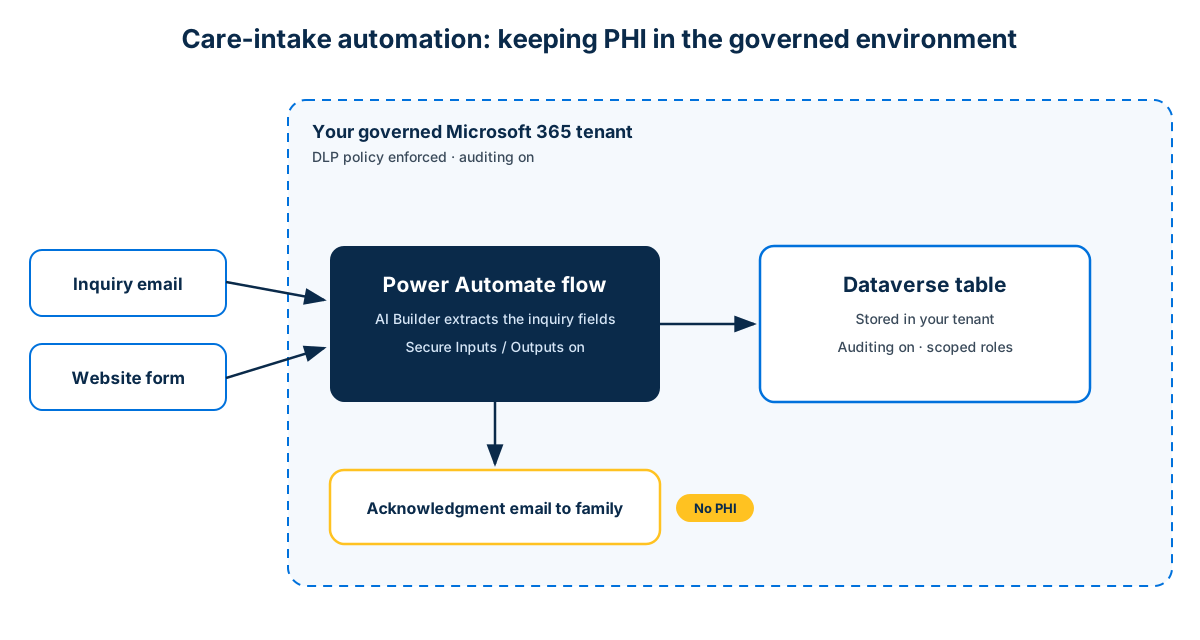
Bring this back to the workflow most care operators actually want: turning inquiry email and web-form submissions into tracked leads without retyping. The moment that data includes health details about a prospective resident, treat it as PHI and design accordingly:
- Build the flow and store records in Dataverse inside your own tenant, not in an outside tool you have no BAA with.
- Turn on auditing for the intake tables, and scope security roles so only admissions staff see full inquiry detail.
- Apply a DLP policy so the flow cannot route inquiry content to an unapproved connector or external service.
- Turn on Secure Inputs and Outputs on the actions that carry health details, so the run history does not become an unguarded copy of PHI.
- Keep automated acknowledgment emails to the family free of health specifics. A warm “we received your inquiry and will call you today” needs no PHI in it.
- Watch what leaves the governed environment. Approval requests, adaptive cards, and action-notification emails copy their content into staff mailboxes and Teams, outside the Dataverse boundary. Keep PHI out of those payloads and reference the record by ID or link instead.
- Document the data flow and retention, because that documentation is part of your own compliance program, which Microsoft’s BAA does not provide for you.
Configured this way, the same automation that gives your team back hours also keeps PHI inside the environment you already govern.
If you are an operator rather than the person who will build this, the practical next step is short: hand your IT lead or Microsoft partner the data-flow above and ask them to confirm your BAA is in place and which environment will hold the data. A capable team can own this end to end, which is the whole point of learning to build and govern it in-house rather than renting a black box. For where Power Automate fits against heavier integration tools, see Logic Apps vs Power Automate.
What this is not
This article is technical guidance, not legal advice, and it does not make any specific solution compliant. A real compliance program needs your own policies, processes, and, where the stakes warrant it, your own counsel. Power Automate and the wider Power Platform are tools that can be used compliantly; they are not, and cannot be, “compliant” on your behalf. And as Microsoft notes for Copilot Studio, that conversational AI agent is not intended for use as a medical device.
FAQ
Is Power Automate HIPAA compliant?
No tool is HIPAA compliant by itself, and Power Automate is no exception. What is true is that Power Automate is an in-scope service under Microsoft’s HIPAA Business Associate Agreement, so you can use it to handle PHI. Your compliance depends on how you configure it (DLP, auditing, least-privilege security, secure inputs and outputs) and on your own policies and processes.
Do I need to sign a BAA with Microsoft?
No separate signing is required. The HIPAA BAA is included by default through the Microsoft Product Terms and Data Protection Addendum for customers that are covered entities or business associates, as part of your existing licensing agreement.
Does the BAA cover the other tools my flow connects to?
Only in-scope Microsoft services. If your flow uses a non-Microsoft connector to an outside service, that vendor needs its own BAA with you. Microsoft’s agreement does not extend to third parties.
Is Microsoft Dataverse covered too?
Dataverse sits inside the Power Platform that Microsoft’s BAA covers, and it keeps your data in the tenant and Azure geography you provision. Combined with auditing and role-based security, it is a strong system of record for PHI-handling workflows.
Can a small care operator actually run this?
Yes. The controls are configuration, not programming, and they are exactly the skills a citizen-development approach builds in your own team. The point of training is that you understand and own the governance rather than depending on an outside vendor to keep you compliant.
Stay in the loop
Get new posts delivered to your inbox. No spam, unsubscribe anytime.
Related articles
Power Automate Email to CRM: Turn Inbox Messages Into Records
Build a no-code Power Automate flow that turns inbound email into a CRM record using the Outlook trigger, AI Builder, and Dataverse.
Free Power Automate Training: Where to Actually Start in 2026
Genuinely free Power Automate training: official Microsoft Learn paths, free hands-on practice, free guides, plus an honest note on where free stops.
Power Automate for Teams: Triggers, Actions, and Patterns (2026)
Power Automate for Microsoft Teams: posting messages and approval cards, the triggers that start a flow, copy-ready patterns, and the limits to plan around.