
No role sits closer to Microsoft 365 than the executive assistant. The inbox, the calendar, the meeting notes, the travel brief, the board pack: the entire job runs through Outlook, Teams, Word, and PowerPoint. Which is exactly why Copilot changes more for executive assistants than for almost anyone else in the building, and why “good with Copilot” is becoming part of what the role means.
This page covers the Copilot workflows that matter for EA work, the prompts worth keeping, and the $49 course we are building specifically for executive assistants working in Microsoft 365.
Updated June 2026.
Copilot for executive assistants: why this role, specifically
Microsoft 365 Copilot is the paid per-seat add-on that works inside Outlook, Teams, Word, and PowerPoint, distinct from the free Copilot chat in the browser (licensing details on Microsoft Learn). Its value is a direct function of how much of your day lives in those apps. For an executive assistant, that is most of the day:
- Inbox triage. Summarize long threads, draft replies for review, and surface the three emails that actually need a decision, in your own mailbox today. Copilot’s support inside a delegated executive mailbox is still limited (Microsoft’s deployment docs ground it on your own cloud mailbox), and the course covers what works where, plus the workarounds EAs actually use.
- Calendar negotiation. Draft the reschedule emails, the agenda, and the pre-read request in a fraction of the typing.
- Meetings you did not attend. Recap a Teams meeting (where recording and transcription were on), pull the action items, and turn them into minutes for distribution.
- Documents under deadline. First-pass a briefing doc in Word from bullet notes, or turn an approved outline into a working PowerPoint deck.
- The recurring packets. Weekly reports, travel briefs, and board-pack assembly: Copilot drafts the content; fitting it to the house template stays your job, for now.
The judgment is the point. None of this removes the EA’s actual skill, which is knowing what the executive needs before they ask. It removes the typing between knowing and done.
AI for executive assistants: five prompts that earn a permanent spot
Five Copilot prompts for executive assistants, written for Microsoft 365 and portable to whatever your organization sanctions:
- Thread to decision brief. “Summarize this email thread in 5 bullets: what is being decided, who is waiting on whom, the deadline, and what [executive] needs to do. Flag anything with a date in the next 7 days.”
- Voice-matched draft. “Draft a reply declining this meeting request, warm but firm, two sentences, offering [alternative]. Match the tone of these two examples: [paste two short past replies].”
- Minutes from a recording. “From this meeting recap, produce minutes: attendees, decisions made, action items with owners and dates, and open questions. Keep it to one page.”
- Travel brief. “Build a one-page travel brief from these confirmations: timeline with local times, addresses, confirmation numbers, and a gap analysis of anything missing.”
- Board-pack sweep. “Review this document for inconsistent numbers, undefined acronyms, and formatting that differs from the attached template. List issues; do not rewrite.”
Treat every output as a starting checklist, not a sign-off: names, numbers, and dates get verified by you before anything leaves under the executive’s name. Copilot has real failure modes in exactly this work, misattributed action items and tone drift being the two we see most, which is why the course has a judgment-layer module rather than a disclaimer.
The full template pack, organized by EA task rather than by app, will ship inside the course.
The $49 course: Microsoft Copilot for Executive Assistants
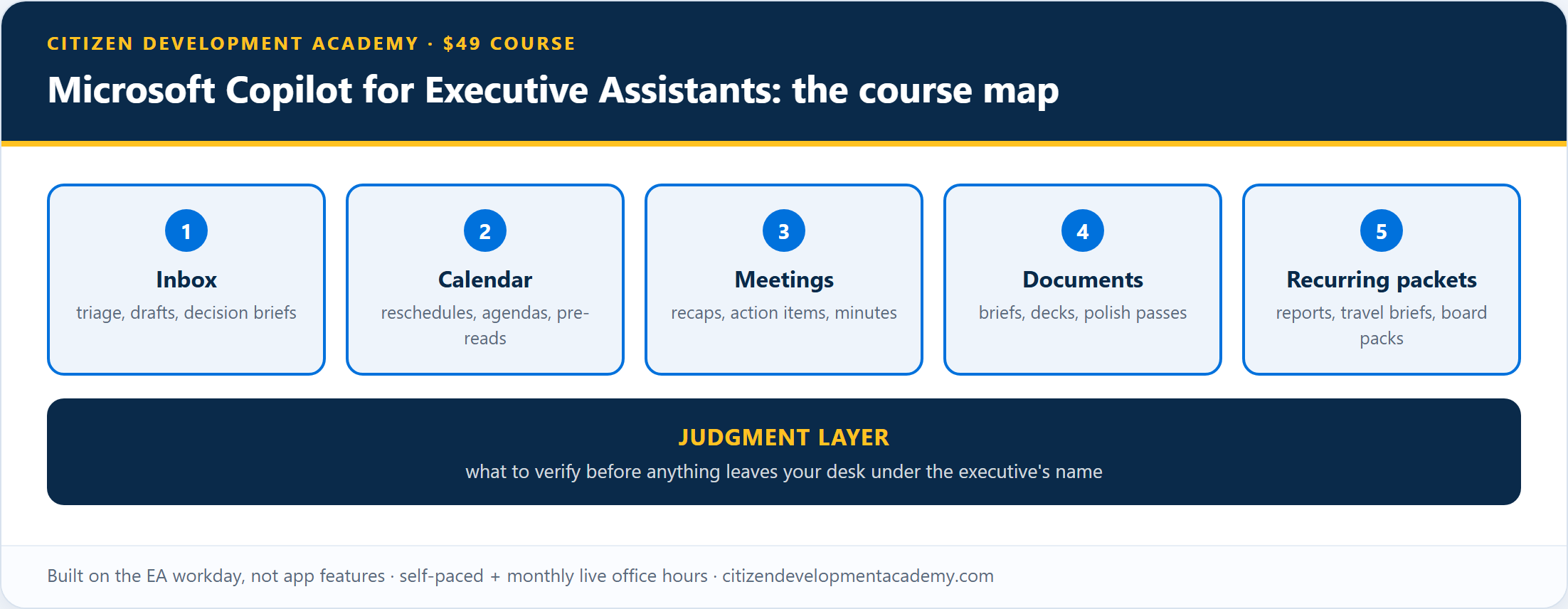
The course is built around the EA workday, not around app features. There is a module each for inbox, calendar, meetings, documents, and the recurring packets, plus the judgment layer: what to verify before anything leaves your desk under the executive’s name.
What it is, plainly:
- Self-paced modules with monthly live office hours, taught by Microsoft Certified Trainers from a Microsoft Learning Partner.
- Built for executive assistants in Microsoft 365 shops; every exercise is an EA task, not a generic demo.
- $49.
And what it is not:
- Not a certification, and it carries no continuing-education credit (no CEUs or PACE credits).
- Not generic AI literacy; if you want an introduction to what AI is, free options cover that.
- Not a change to your confidentiality obligations. Even where the in-app features lag in a delegated mailbox, assume Copilot can draw on anything your account can open: what you would not forward you should not paste. Your organization’s data policies still apply, and the judgment module covers what to check before sensitive material goes in.
- Copilot access is not included; the hands-on work needs your organization’s Microsoft 365 Copilot seat. Exercises that run on the free browser Copilot will be marked, so a seatless EA can start there.
- Not a promise that Copilot output is send-ready. Names, numbers, and dates still get verified by you; the judgment-layer module exists for exactly that.
For market context, the established options for this audience:
| Program | Format | List price |
|---|---|---|
| This course (waitlist) | Self-paced + monthly live office hours | $49 |
| ASAP’s “Admin Management with Microsoft AI and Automation” | 4-hour course | $395 |
| EA Campus Copilot Masterclass (UK) | Live cohort or on-demand | £450 live / £350 on-demand |
Prices as of the June 2026 check. ASAP’s course carries PACE recertification credits for that program, which ours does not. If CEUs are the deciding factor for your recertification cycle, that is the honest tiebreaker in their favor. If applied Microsoft-stack depth at an accessible price is the goal, that is the gap this course exists to fill.
Enrollment is not open yet; it opens when the first module set clears review. The five prompts above are yours either way; the waitlist gets the launch schedule first, the full access terms and refund policy before checkout opens, and enrollment before the public launch.
Is there an AI certification for executive assistants?
As of the June 2026 check, there is no industry-standard AI certification for executive assistants: no association or vendor issues an accredited credential for AI skills in this role specifically. What does exist is completion certificates, association CEUs through ASAP, and adjacent Microsoft certifications, each with a different job:
- Completion certificates, ours included, which show you finished the training; they are not accreditations and carry no continuing-education credit.
- Association CEUs: ASAP’s PACE program requires 2.4 CEUs per two-year cycle (as of the June 2026 check), and ASAP sells an AI course that earns them. If you hold PACE, that path runs through ASAP’s own catalog.
- Microsoft certifications with third-party weight: PL-900, Power Platform Fundamentals if your role is growing toward building automations, and AB-900, Copilot and Agent Administration Fundamentals if you are becoming the person who manages Copilot for the office.
For the day-to-day Copilot skills themselves, the $49 course on this page is the path we are building.
Built by a Microsoft Learning Partner

Citizen Development Academy is a Microsoft Learning Partner. Partner status governs the standards under which we deliver Microsoft official training; this course is our own curriculum, and Microsoft does not endorse or review it. Our live classes are delivered by Microsoft Certified Trainers, and the same people are building this course.
Training a whole admin team?
If you support an executive office or admin team, use the waitlist form and mention your team size; we will follow up about private cohort delivery (the broader offer is described on the corporate teams page).
FAQ
What can Copilot actually do for an executive assistant?
Inside Microsoft 365: summarize and draft email in Outlook (in your own mailbox; delegated-mailbox support is more limited), recap meetings where recording and transcription were on and pull action items in Teams, first-draft documents in Word, build decks from outlines in PowerPoint. The leverage comes from how much EA work already lives in those four apps.
Do I need to know how to code?
No. Everything on this page and in the course is prompting and configuration, not programming.
Does the course earn CEUs or PACE credits?
No. It carries a completion certificate only. If PACE recertification is your priority, ASAP’s own AI courses earn those credits.
What license do I need?
The hands-on exercises use a Microsoft 365 Copilot seat from your organization, working in your own mailbox and files. Exercises that run on the free browser Copilot will be marked, but the in-app workflows above need the paid seat.
How much does it cost, and when does it open?
One-time $49, self-paced with monthly live office hours. Enrollment opens when the first module set clears review; the waitlist gets the launch schedule first.
What exactly do I get for $49?
The exact access terms (access duration and the office-hours inclusion period) and the refund policy will publish before checkout opens, and the waitlist sees them first. The price is one-time, not a subscription.