
Organizations are buying Microsoft 365 Copilot faster than they are using it. Independent survey work from Recon Analytics puts the workplace Copilot conversion rate, people with a seat who actually use it, at about 36%.
The license is the easy part. One reason value lags is that people never learn to use Copilot on the work they actually do, which is the part training closes, and it is why “Copilot training” is not one thing.
This page is the map. It covers what every good Copilot training shares, why the role layer is the part that matters, and which program fits your job.
Updated June 2026. Figures are sourced inline.
Why Copilot training is role-specific
Microsoft 365 Copilot is the paid assistant inside Outlook, Word, Teams, Excel, and SharePoint (licensing on Microsoft Learn). Its value to you tracks two things that change completely from one role to the next:
- Which apps your day lives in. An accountant lives in Excel; an executive assistant lives in Outlook and Teams; a legal team lives in Word and document libraries. The same tool earns its keep in different places, so the examples that teach it well are different.
- What you are not allowed to get wrong. A lawyer has confidentiality and competence duties; an HR team has hiring-decision rules; an accountant has review and sign-off standards. Generic “10 Copilot prompts” training skips exactly the part that makes adoption safe in a regulated job.
A demo that works for a marketer can be useless, or worse, for a paralegal: a generic “10 prompts” deck never tells that paralegal what they must never paste into a prompt. Role-specific training uses your tools, your tasks, and your guardrails, which is why it is the version most likely to change behavior, where generic decks stall.
What every Copilot training shares
Underneath the role layer, the core is the same, and it is worth knowing before you pick a program:
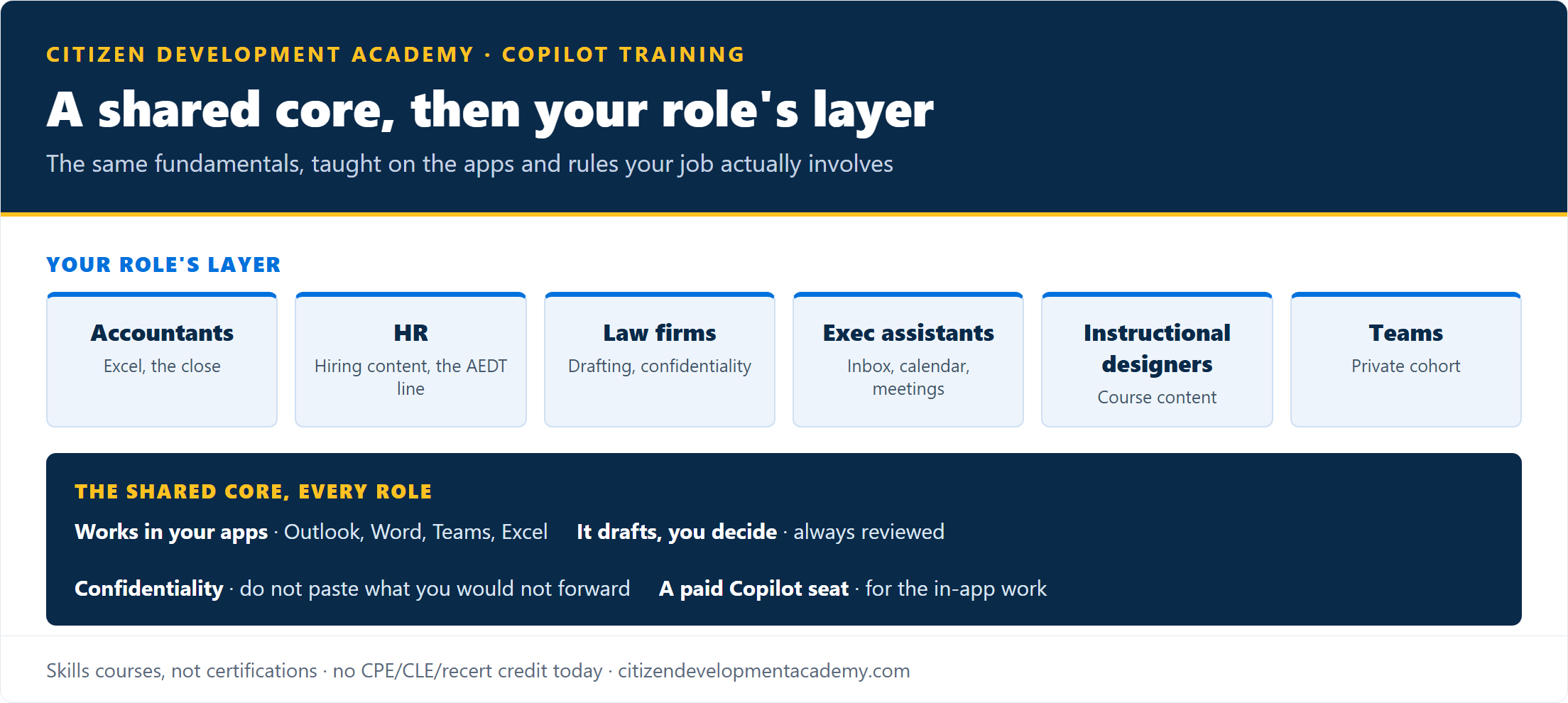
- It works inside the apps you already use. The skill is getting Copilot to draft, summarize, and find things in Outlook, Word, Teams, and Excel, not learning a separate product.
- It drafts; you decide. Copilot is a strong first-draft and summarization engine, not a consistently correct one. Every output is a starting point you check before it sends, posts, or counts.
- Confidentiality is a setting plus a habit. Copilot can draw on whatever your account can open, so what you would not forward, you should not paste, and your organization’s data rules still apply.
- A paid seat is required for the in-app work. The hands-on workflows need a Microsoft 365 Copilot license; the free browser Copilot is a separate tool that does not carry the enterprise data protection your licensed apps do.
Any training that skips the “you decide” and confidentiality layers is teaching prompts, not practice.
Find the training for your role
We build role-specific programs around that shared core. Each page below covers the workflows, the guardrails, and the honest answer on credit for that role:
- Accountants and finance: Copilot for Accountants covers Excel, client email, and the recurring close, with the verify-before-it-posts discipline built in.
- HR: AI for HR Professionals covers job postings, policies, and employee email, plus the line between drafting and a regulated hiring decision.
- Legal: Copilot for Law Firms covers client letters, memos, and document review, with the confidentiality and competence duties built in.
- Executive assistants: Copilot Training for Executive Assistants covers inbox triage, calendar, and meeting recaps, in your own mailbox.
- Instructional designers: AI for Instructional Designers covers drafting course outlines, learning objectives, and assessment content.
- Whole teams: Power Platform Training for Corporate Teams runs as a private cohort on your own tools and templates.
Role guides for executives and finance teams are also live on the blog. More role programs (IT, project management, and others) are in production; if yours is not listed yet, tell us your role and we will point you to the closest fit or a free path in the meantime.
How to choose
Two questions settle it:
- Just you, or a team? For one person, pick your role page above and join its course waitlist. For a group, team training runs as a private cohort using your tools and templates.
- Do you need the Copilot admin credential? If your job is becoming the person who manages and governs Copilot, that is a different track: AB-900, the Copilot and Agent Administration Fundamentals certification, not a role-skills course.
The honest part
A few things we say on every page, gathered here so you know them up front:
- These are skills courses, not certifications. They carry a completion certificate, not an accreditation. The one Microsoft certification in this space is AB-900, covered separately.
- No continuing-education credit today. Where a profession has CPE, CLE, or recertification credit, our courses do not carry it yet; each role page says so plainly and points to where that credit exists.
- Sometimes the free path is enough. If a free Microsoft Learn path gets you where you need to be, we will say so rather than sell you a course.
Built by a Microsoft Learning Partner

What partner status means, and what it does not. Citizen Development Academy is a Microsoft Learning Partner: that status governs the standards under which we deliver Microsoft official training, and our courses are taught by Microsoft Certified Trainers. It does not mean Microsoft endorses or reviews our role courses, which are our own curriculum.
FAQ
What is Microsoft Copilot training?
Practical instruction on using Microsoft 365 Copilot, the paid assistant inside Outlook, Word, Teams, and Excel, on real work. Good training is role-specific: it uses the apps and tasks your job actually involves and teaches the judgment and confidentiality habits that make it safe, not just a list of prompts.
Is there one Copilot course for everyone?
No, and that is the point. Copilot’s value depends on which apps your role lives in and what your role cannot get wrong, so the useful version is role-specific. Pick your role from the list above; the shared core (it drafts, you decide; confidentiality; a paid seat) is the same across all of them.
Does Copilot training include a certification?
The role-skills courses carry a completion certificate, not an accreditation. The Microsoft certification for Copilot administration is AB-900; if your goal is the credential rather than day-to-day skills, start there.
Do I need a Microsoft 365 Copilot license to take the training?
For the hands-on, in-app exercises, yes: those need a Microsoft 365 Copilot seat. Some concepts can be followed on the free browser Copilot, but the workflows that make Copilot worth it run inside your licensed apps.