
AI is moving from a curiosity to a line item in accounting job descriptions. A Datarails study of more than 5,000 US finance job postings found that accountant postings listing AI-skill requirements rose from 18% in January 2025 to 30% in January 2026, a 67% increase and the largest year-over-year jump of any finance function. You do not need to become a data scientist to respond. This page takes the Microsoft 365 route: the Excel, Outlook, and close work you already do, done with less typing and searching, using the Copilot sitting inside those apps.
This page covers the Copilot workflows that hold up in real accounting work, the prompt patterns worth keeping, the honest answer on CPE credit, and the $49 course we are building for accountants who work in Excel and Outlook all day, which is most accountants.
Updated June 2026. Statistics are sourced inline; competitor prices reflect the June 2026 check.
Copilot for accountants: why this role, specifically
Microsoft 365 Copilot is the paid per-seat add-on that works inside Excel, Outlook, Teams, and Word, distinct from the free Copilot chat in the browser (licensing details on Microsoft Learn). Its value tracks how much of your day lives in those apps, and for accountants the center of gravity is obvious:
- Excel, where the work actually happens. Ask Copilot to explain an unfamiliar formula, draft one from a plain-language description, or summarize the differences between two schedules pasted side by side. Excel is where Copilot is most useful and least forgiving: it works best on clean, structured tables, and its numbers always get re-checked.
- Client and colleague email. Summarize a long thread into what the client actually asked, and draft the reply for your review.
- Meetings you bill for. Recap a recorded Teams call (where recording and transcription were on), pull the action items, and turn them into the follow-up note.
- Memos and letters. First-draft an engagement memo or a procedure write-up in Word from your bullet notes; the technical judgment stays yours.
- The recurring close. Month-end and quarter-end checklists follow the same shape every period; Copilot drafts against your templates, and Power Automate routes the reviews.
None of this touches the part of the job that is actually accounting: the judgment, the standards, the sign-off. It compresses the typing and searching between those moments.
AI prompts for accountants: five that earn a permanent spot
Five Copilot prompts for accountants, written for Microsoft 365 and portable to whatever your firm sanctions:
- Variance first pass. “Compare these two columns of monthly figures. List the five largest variances by absolute value and percentage, and draft one neutral sentence describing each, with no speculation about causes.”
- Formula explainer. “Explain what this formula does, step by step, in plain language, and list the conditions under which it returns an error: [paste formula].”
- Thread to client brief. “Summarize this email thread in five bullets: what the client asked, what we promised, open items with owners, deadlines, and anything with a dollar amount. Flag anything due in the next 7 days.”
- Close checklist draft. “From this list of last month’s close tasks, draft this month’s checklist: same structure, updated dates, and a flag on any task that depended on a person who is out this week: [paste list and absences].”
- Policy-to-plain-language. “Rewrite this procedure note at a level a first-year staff accountant can follow without losing technical accuracy, and list any steps that look ambiguous: [paste note].”
Treat every output as a starting draft, not a sign-off: figures, dates, and client names get verified by you before anything posts or sends. The failure modes to plan for in this work: plausible-but-wrong numbers in summaries and overconfident variance narratives. That is exactly why the course will have a judgment-layer module rather than a disclaimer.
The full template pack, organized by accounting task rather than by app, will ship inside the course.
Does Copilot training count for CPE credit for CPAs?
This course does not carry NASBA CPE credit today. Citizen Development Academy is not currently a NASBA-registered CPE sponsor. If that changes, this page will say so plainly; we will not imply credit we cannot issue, and waitlist members will be the first to hear if our sponsor status changes.
Most paid AI training for CPAs is sold with NASBA CPE credit attached, so if continuing-education credit is what you need this cycle, here is where it exists today.
State CPA societies list Copilot and AI courses with CPE hours; the Minnesota Society of CPAs has a 2-CPE “Microsoft Copilot Deep Dive Hands-on Bootcamp for CPAs” at $89 on its June 2026 calendar. Becker sells an AI for Accounting & Auditing Certificate with 9 CPE hours, at $212 at the June 2026 check. If CPE is your deciding factor, those are real options and the honest tiebreaker is in their favor.
What this course offers instead is the applied layer at an accessible price: Microsoft-stack depth on your actual daily work, for $49, from Microsoft Certified Trainers.
| Program | Format | CPE credit | Price (June 2026 check) |
|---|---|---|---|
| This course (waitlist) | Self-paced + monthly live office hours | No | $49 |
| MNCPA Copilot bootcamp | Live webinar | 2 CPE | $89 |
| Becker AI certificate | 4 on-demand courses | 9 CPE | $212 (list $249) |
The $49 course: Microsoft Copilot for Accountants
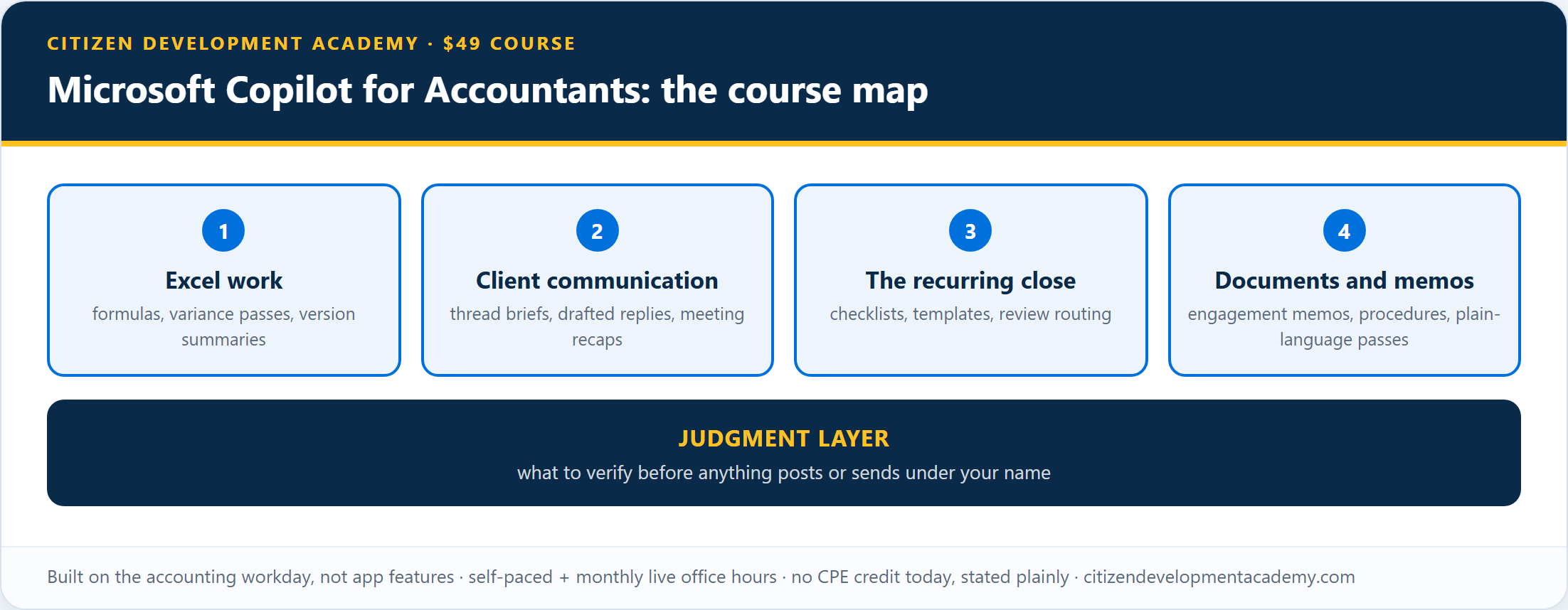
The course is being built around the accounting workday, not around app features. There will be a module each for Excel work, client communication, the recurring close, and documents and memos, plus the judgment layer: what to verify before anything posts under your name.
What it is, plainly:
- Self-paced modules with monthly live office hours, built and taught by Microsoft Certified Trainers from a Microsoft Learning Partner.
- Built for accountants in Microsoft 365 shops; every exercise is an accounting task, not a generic demo.
- $49, one-time.
And what it is not:
- Not CPE. No NASBA credit today, stated plainly above.
- Not a certification or certification prep, and not generic AI literacy.
- Not a change to your confidentiality obligations. Assume Copilot can draw on anything your account can open: what you would not forward, you should not paste. Your firm’s data policies still apply, and the judgment module covers what to check before client data goes in.
- Not a promise that Copilot output is post-ready. Figures, dates, and names still get verified by you.
- Not a tour of accounting-specific AI tools. Audit analytics platforms, tax research AI, and the copilots inside your accounting software are different products; this course covers the Microsoft 365 layer your whole workday runs on.
- Not a Copilot license. Access is not included; the hands-on work needs a Microsoft 365 Copilot seat (your firm’s, or your own if you run a solo practice). Exercises that run on the free browser Copilot will be marked.
Enrollment is not open yet; it opens when the first module set clears review. The five prompts above are yours either way. The waitlist gets:
- the launch schedule first,
- the full access terms and refund policy before checkout opens,
- and enrollment before the public launch.
Copilot training for accounting firms and teams
The buying gap is documented from the firm side too: Thomson Reuters’ 2025 Generative AI in Professional Services report found that “only 25% of tax and accounting firms are actively investing in AI training for their employees.” For the firms that do invest, that is a differentiator in both recruiting and client work.
If you are training a team rather than yourself, private cohort delivery is the better shape: see Power Platform training for corporate teams, or use the waitlist form and mention your firm size.
Is there an AI certification for accountants?
As of the June 2026 check, there is no Microsoft certification specific to AI for accountants. What exists, honestly framed:
- Completion certificates, ours included, which show you finished the training; they are not accreditations and carry no CPE.
- CPE-bearing programs from NASBA-registered sponsors, covered honestly above.
- Microsoft certifications with third-party weight: AB-900, Copilot and Agent Administration Fundamentals if you are becoming the person who manages Copilot at the firm, and PL-900, Power Platform Fundamentals if your role is growing toward building automations.
The AICPA also launched an AI Skills Accelerator program in April 2026; check its CPE terms directly. For the day-to-day Copilot skills themselves, the $49 course on this page is the path we are building.
Built by a Microsoft Learning Partner

Citizen Development Academy is a Microsoft Learning Partner. Partner status governs the standards under which we deliver Microsoft official training; this course is our own curriculum, and Microsoft does not endorse or review it. Our live classes are delivered by Microsoft Certified Trainers, and the same people are building this course.
FAQ
What can Copilot actually do for an accountant?
Inside Microsoft 365: explain and draft formulas and summarize changes in Excel, summarize and draft client email in Outlook (in your own mailbox; delegated-mailbox support is more limited), recap meetings where recording and transcription were on in Teams, and first-draft memos in Word. The leverage comes from how much accounting work already lives in those apps.
Does this course count for CPE?
No. It carries a completion certificate only; Citizen Development Academy is not a NASBA-registered CPE sponsor today. If CPE is your priority this cycle, credit-bearing options exist from state societies and established providers, listed honestly above.
Do I need to know how to code?
No. Everything on this page and in the course is prompting and configuration, not programming.
What Microsoft 365 Copilot license do I need?
The hands-on exercises use a Microsoft 365 Copilot seat, your firm’s or your own if you run a solo practice, working in your own mailbox and files. Exercises that run on the free browser Copilot will be marked, but the in-app workflows above need the paid seat.
How much does it cost, and when does it open?
One-time $49, self-paced with monthly live office hours. Enrollment opens when the first module set clears review; the waitlist gets the launch schedule first.