Copilot for IT: Governing and Deploying It Safely (2026)
Copilot for IT: why oversharing is the first job, the controls that gate it, how to pilot and measure adoption, and the governance skill to build.

In this article · 11 sections
For most roles, “Copilot” means using it. For IT, it means governing it. Microsoft 365 Copilot is permission-trimmed: it is designed to surface only content a user can already open, so it does not loosen your access model. The catch is the inverse. Anything that was quietly overshared, the finance folder with broad access nobody noticed, the old site set to “everyone,” becomes instantly findable the moment a user can ask for it in plain language. Copilot does not create the exposure; it makes the exposure you already had impossible to miss.
That is why an IT team’s Copilot work is not prompt training. It is access governance, a rollout plan, and a way to measure whether the seats you bought are being used. This page walks the governance job, the controls that gate it, and the skill to build if you are becoming the person who runs Copilot for your organization.
Updated June 2026 against Microsoft’s current Copilot deployment and governance documentation.
Why oversharing is IT’s first Copilot job
Because Copilot honors existing permissions, the deployment risk is not the model; it is the state of your tenant. Microsoft frames Copilot readiness as getting your data ready first, and names the services that support it: SharePoint Advanced Management to find and reduce oversharing, Restricted SharePoint Search to buy time while you review permissions, and Microsoft Purview to classify and protect sensitive content.
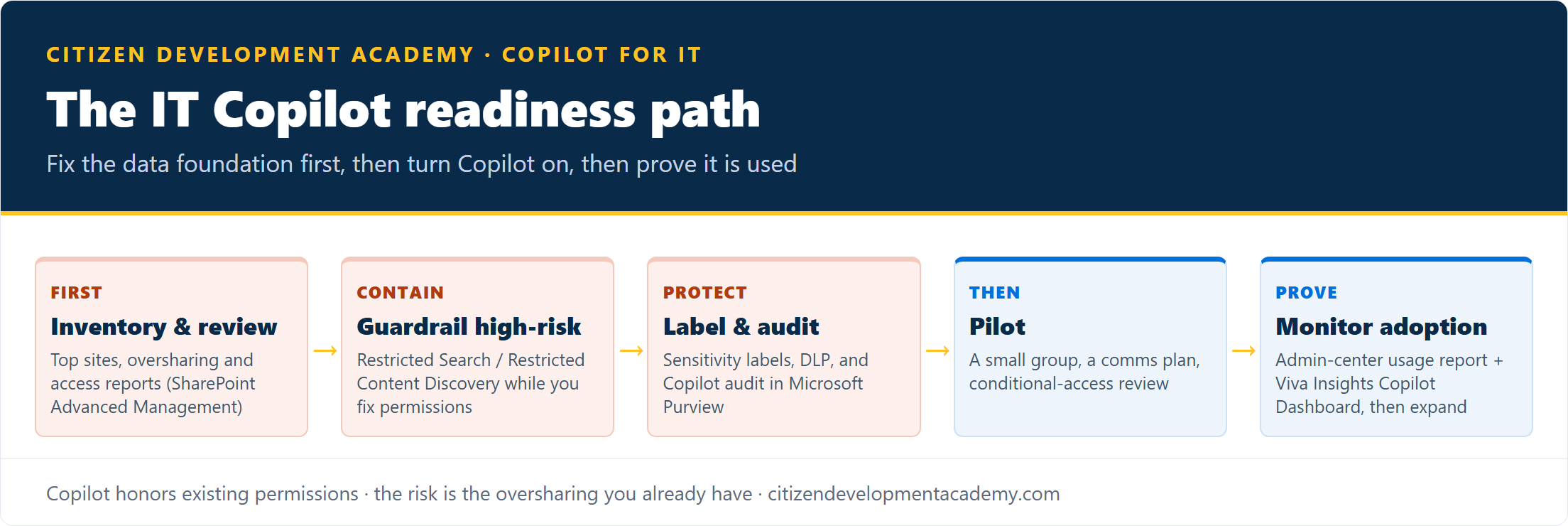
The honest sequence is: find the oversharing, contain the highest-risk sites, label the sensitive data, then turn Copilot on for a pilot group, not the other way around. A rollout that skips the permissions review does not fail loudly; it just quietly lets people find things they were always technically able to reach but never would have.
The controls that gate a safe rollout
These are the levers an admin actually pulls, all from Microsoft’s deployment guidance:
| Layer | Control | What it does | When to use it |
|---|---|---|---|
| Access | SharePoint Advanced Management | Oversharing and data-access-governance reports, site access reviews, restricted access control | Find and fix broad access before and during rollout |
| Discoverability | Restricted SharePoint Search | A temporary allowed list (up to 100 sites) limiting which sites the org-wide search index and Copilot retrieval surface; does not block a site a user navigates to directly or that was shared with them | A short-term guardrail while you review permissions; disable once validated |
| Discoverability | Restricted Content Discovery | Hides specific high-risk sites from org-wide search and Copilot chat without changing their permissions | Containing a few known high-risk sites, not a blanket setting |
| Data protection | Microsoft Purview | Sensitivity labels, DLP, and auditing of Copilot prompts and responses | Classify and protect sensitive content; audit Copilot activity |
Two things matter about that table. First, Restricted SharePoint Search is a stopgap, not a security boundary: Microsoft is explicit that it is for buying review time and should be turned off after validation, and that a user can still reach a site they recently visited or that was shared with them. Second, the durable answer is the unglamorous one: review the permissions, because the tools surface the oversharing but closing it is access-governance work no setting does for you.
One cost note for planning: SharePoint Advanced Management and Restricted Content Discovery are licensed capabilities (SAM is a standalone add-on and is also included with a Microsoft 365 Copilot license), so factor them into the rollout rather than assuming they are on by default.
Rollout: pilot, measure, then expand
Once the data foundation is in order, the rollout is a normal IT change: a readiness and pilot process of a test tenant or pilot group, a communication plan, conditional-access review, then a staged expansion.
The step teams skip is measuring whether it worked. Microsoft gives IT two reporting surfaces: the Microsoft 365 admin center’s Copilot readiness and usage reports (license eligibility, who is active, which apps), and the Viva Insights Copilot Dashboard (adoption trends and impact). They matter because adoption is not automatic: independent survey work from Recon Analytics put the share of license-holders who actually use Copilot at about 36% in its 2026 survey. Watching the usage report is how IT catches the other two-thirds before the renewal conversation does.
The skill to build: running Copilot, not just using it
If your role is becoming the person who administers and governs Copilot, that is a distinct skill set: permissions and oversharing remediation, Purview policy, the admin controls above, and the rollout and adoption work. Microsoft has a certification aimed squarely at it.
AB-900, the exam behind the Microsoft 365 Certified: Copilot and Agent Administration Fundamentals certification, is aimed at the person who deploys and governs Copilot, not the person who writes prompts in it. If you are the one being handed the Copilot rollout, that is where to start; our AB-900 prep page covers the exam and the free study resources. For the other roles in your organization who will use Copilot day to day, the Copilot training by role hub points each to the right program.
What this covers, and what it does not
Honest boundaries, the same ones on every page:
- This is the governance and rollout skill, not a tenant-hardening service. We teach the controls and the deployment approach; the actual permissions remediation and Purview configuration are work your team or a security partner does in your tenant.
- It is not legal or compliance sign-off. Where Copilot use intersects regulated data, your compliance team owns the call; the controls here support that, they do not replace it.
- AB-900 is a Microsoft certification, separate from our courses. Our role is helping you prepare for it and build the practical skills around it.
FAQ
Does Microsoft 365 Copilot expose data it should not?
No, not by itself: Copilot enforces existing permissions and surfaces only content a user can already open, with documented edge cases such as a site a user recently visited or that was directly shared with them. The real risk is pre-existing oversharing, files and sites with broader access than intended, which Copilot makes easy to find. The fix is an access and oversharing review before rollout, using SharePoint Advanced Management and Microsoft Purview.
What is the first thing IT should do before turning on Copilot?
Review permissions and find oversharing. Identify your most-used sites, run SharePoint Advanced Management’s oversharing reports, and contain the highest-risk sites with Restricted SharePoint Search or Restricted Content Discovery while you fix the underlying access. Label sensitive data with Purview, then pilot.
Is Restricted SharePoint Search a permanent fix?
No. Microsoft designed it as a temporary measure, capped at 100 sites and not a security boundary, to buy time while you review permissions. It should be disabled after validation so Copilot can rely on standard permission-based access. The durable fix is correcting the permissions themselves.
How does IT measure Copilot adoption?
Through the Microsoft 365 admin center’s Copilot readiness and usage reports and the Viva Insights Copilot Dashboard. They show who is licensed, who is active, and which apps are used. This matters because only about a third of license-holders actually adopt Copilot (Recon Analytics, 2026), so monitoring is how IT spots underuse early.
What certification covers Copilot administration?
AB-900 is the exam behind the Microsoft 365 Certified: Copilot and Agent Administration Fundamentals certification, aimed at the person who deploys and governs Copilot. It is the right track if your job is running Copilot for the organization rather than using it in your own work.
Stay in the loop
Get new posts delivered to your inbox. No spam, unsubscribe anytime.
Related articles
Copilot for Executives: What Leaders Actually Use It For (2026)
Copilot for executives: the inbox, meeting, and briefing work it actually saves a leader, plus the adoption decision only an executive can make.
Copilot for Finance Teams: Where It Fits the Function (2026)
Copilot for finance teams: the Excel, reporting, and close work it actually speeds up, why team consistency matters, and how to verify the numbers.